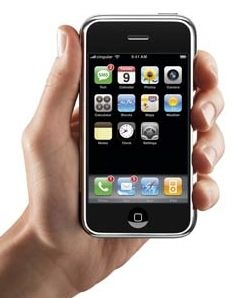
 Apple unveiled its iPhone last year among an incredible swell of hype. While the phone was ground-breaking in some areas, it was extremely expensive and woefully short of basic features seen in PDAs for well over a decade. A year later, Apple released its second version of the phone and made huge strides in some areas, yet still leaves a tire stuck in the mud.
The Good
The new iPhone is the best mobile web browsing experience to date, and it’s not even close. The full rendering of non-flash containing websites is fabulous, and has made my life on the go much more seamless. I’m able to save time by checking restaurant hours, check my gmail email, view maps, view traffic conditions, etc. The phone is slick as all get-out. By that I mean that the multi touch interface is incredibly intuitive and fun to use. I love scrolling a long screen by dragging. The flick action, which makes pages spin by like the Price Is Right Bonus Wheel, is outstanding.
The phone’s ability to know when it’s being turned sideways comes in handy when viewing wide websites, video, and photos on its large screen. Also, the fonts used and the layout of operating system pages is beautiful. It is a gorgeous device that I enjoy powering on.
The biggest impact of the new iPhone is not its speedier 3G connection, but rather the Apple App Store. Tons of free and cheap applications allow users to add applications for their favorite social sites (Facebook, Twitter, etc), play games, listen to music on the internet, etc. The most useful for me have been the Facebook app, Twitter, and Pandora apps. With Pandora I’m able to ride around town listening to free music on Pandora instead of the radio or CDs I’m sick of. (I would love a Rhapsody app, but that’ll be the day)
There are some fabulous apps, and there’s no reason to believe the selection and functionality won’t improve. One of the best apps is the Evernote app. If you have a free Evernote account, the iPhone app allows one to access their online notes with an interface that is much more appropriate to mobile units than Evernote’s web page. Evernote is by far the best system by which to jot notes that you want to always access.
Remember The Milk is my new ToDo list manager. Based on a web interface, RTM allows one to assign multiple tags to tasks. This is perfect for a Getting Things Done system of lists. Therefore items like “Buy balloons for reunion” could show up in a project-based list (like “.reunion”) AND a context-based list (like “@errands”). This feature was one of the key factors leading me toward the iPhone. Palm’s todo list app does not allow multiple tagging.
The phone aspects of the device are excellent as well. When I actually get an AT&T signal (most places not called “my house”), the sound quality is fantastic. I adore the Visual Voicemail portion of the phone, and the Contact Manager is well done. (this allows me to a see a list of my voicemails and play them as local files)
I really enjoy the iPhone’s 3.5mm headphone connector. The first generation’s socket was recessed, and only cheap headphone plugs would fit. This socket is flush with the convex exterior, and is a joy compared to my Treo’s 2.5mm socket (which required an adapter). Now I’m able to plug in nice headphones and feel like I’m in the room where the music was originally compressed!
Finally, I am enjoying the iPhone for playing podcasts. I listen to about 8 different podcasts weekly, and the iPhone’s syncing to iTunes and its system of marking which episodes have been heard is great. It automatically bookmarks so when you listen to music and return to the podcast it picks up where you left it. I avoided iTunes for a long time due to its slugging performance and walled garden feel. However I have to say that the newest version, running on Vista, works very well. It launches in 4 seconds and manages podcast catching and dumping very well.
The Meh
There are some ballyhooed features that just don’t impact my life at all.
- Movie/TV Show watching – I simply refuse to give in to iTunes’ price-gouging, and have absolutely no desire to keep some DRM-laden copy of an episode of “The Office” in my collection for all time. (I never actually got around to buying the plug-in that converts Windows Media Center files into a format for PDAs, but this subject has become muddy. I plan on buying a dedicated Windows Media Center computer with the Fiji upgrade. That means it will record shows in the new format, not dvr-ms format, so that plug in will be broken anyway)
- Coverflow – What a joke this feature is. It’s pretty, but given that album art isn’t automatically discovered and tagged in iTunes, it’s just a big hassle. I can read, and I like alphabetical order, so give me a list.
- 3G – I guess I can’t appreciate it because I didn’t have Edge, but I find myself pulling on the internet more from places that already have wifi, I suppose.
- Camera – It’s better than the Treo camera, but it’s not that great. It’s….a camera.
- Google Maps and GPS – The phone knows where it is and the Google maps look pretty, but for most of us who spend 99% of our time in the same domain, we really don’t use this feature. My Prius has an excellent nav system, so I will hardly ever use the iPhone’s clunkier GPS system.
The Bad
When things get bad for the iPhone, they aren’t kidding around.
I’ll start with the biggest problem: the battery. I cannot attend a football game and make it through one charge of the battery. It is so bad, that I cannot make it through a day without charging at least twice. While the phone recharges within an hour, it’s no laughing matter. I got the phone for its abilities to surf the net and listen to music. If I have to turn off 3G and wifi sniffing to get decent battery life, then why even have an iPhone? The Treo would make it for three days between charges. I’m getting about six hours with this thing. To make matters worse, there isn’t a replaceable battery. If there were, I could carry around a spare for days that I foresee being hard on the device. So, if this battery is so bad at keeping a charge now, what isn’t going to be like at the end of my 2-year contract period? This is the overriding feature that keeps me from loving the device. Of course, I can compromise by buying a battery sleeve thing for it and a car kit, but then I’ve spent another $100 to make a $200 device operable.
Costs: While the iPhone is only $200, the new plans at AT&T are so much more expensive, that over a two year period the phone actually costs a little more than it did before. AT&T does what they can to take the fun out of things.
Thin and slick – The device looks sexy, but in real use, it’s too thin and slick to handle. I’ve spent $20 on a Speck rubberized cover for it, which sticks to my pocket liner and accumulates lint. Very sexy.
Notes backup – The iPhone has a nice little Notes application. Too bad it doesn’t sync with Outlook. This makes the application useless.
Cable – I like the idea of the sync/power cable. It has one end that is a USB male, and another with an elongated, proprietary iPhone connector (around which an ecosystem has evolved). The phone pulls power over USB when connected to a computer, however the best charging situation occurs when the USB end of the wire is plugged into a supplied power cube. The 1″ cube has two prongs for an AC outlet, and a USB female, into which the cable is plugged. Neat! No cradles. No separate power and sync cables! The problem lies in how cheap this cable feels. It’s thin, limp, and has cheap collars at the connector. Will it make it longer the battery? Who knows. A mini-USB interface would have been far better for this device. Consumers would be able to obtain quality cables from an array of sources.
Lack of Local Productive Apps – While I enjoy Remember The Milk, it is a web-app. They have an upgraded interface for $25 per year that makes the service far easier to use, but at the end of the day, the data and all interaction rely on a decent internet connection. I use mobile todo lists because I think of things to add when I’m shopping, driving, in the yard, etc. It is incredibly frustrating to think of a todo while in a store and spend 2 minutes finding a connection and entering the item. I would far prefer a local todo app that syncs with Outlook and keeps all of the data on the phone.
Wish List
How can Apple make V3 The Ultimate Phone? Simple
- Sync todos and notes with Outlook
- Create a thicker phone with an excellent battery
Really? That’s it? Yep! No device out there is going to be perfect for everyone. However the release of an SDK by Apple has allowed some great developers to create applications that make the iPhone extremely useable. It has the best interface and the best web browsing experience. If someone can just fix this productivity application synching issue, then the woeful batter would remain as the only inexcusable defect.
Tags: Tech // Comments Off on iPhone Limps To Greatness